Automated Guest Notifications
Automated messages along the entire guest journey, from the booking confirmation to the check-out follow-up.
Introduction
LIKE MAGIC supports the online check-in process, and therefore the entire guest journey, through automated messaging. Over email, SMS or WhatsApp, this begins with the initial RESERVATION_CREATED message to start the online check-in and ends with a CHECKOUT_FOLLOW_UP message. In addition, trigger-based messages complement the stay-dependent ones.
1. Default Messaging Flow
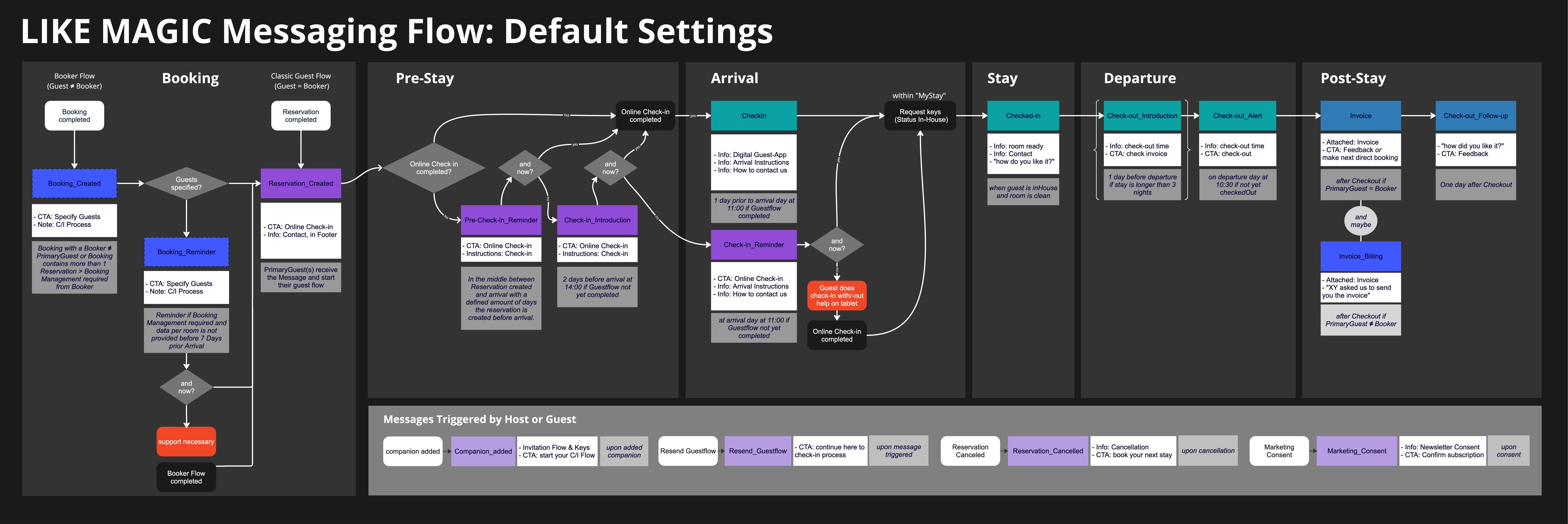
If no modifications are made, the default settings are used.
Each property has its own unique guest journey (e.g. where a call-to-action is placed), and therefore different configurations are ideal. If you would like to adjust the flow for your property, request it via a Support Ticket.
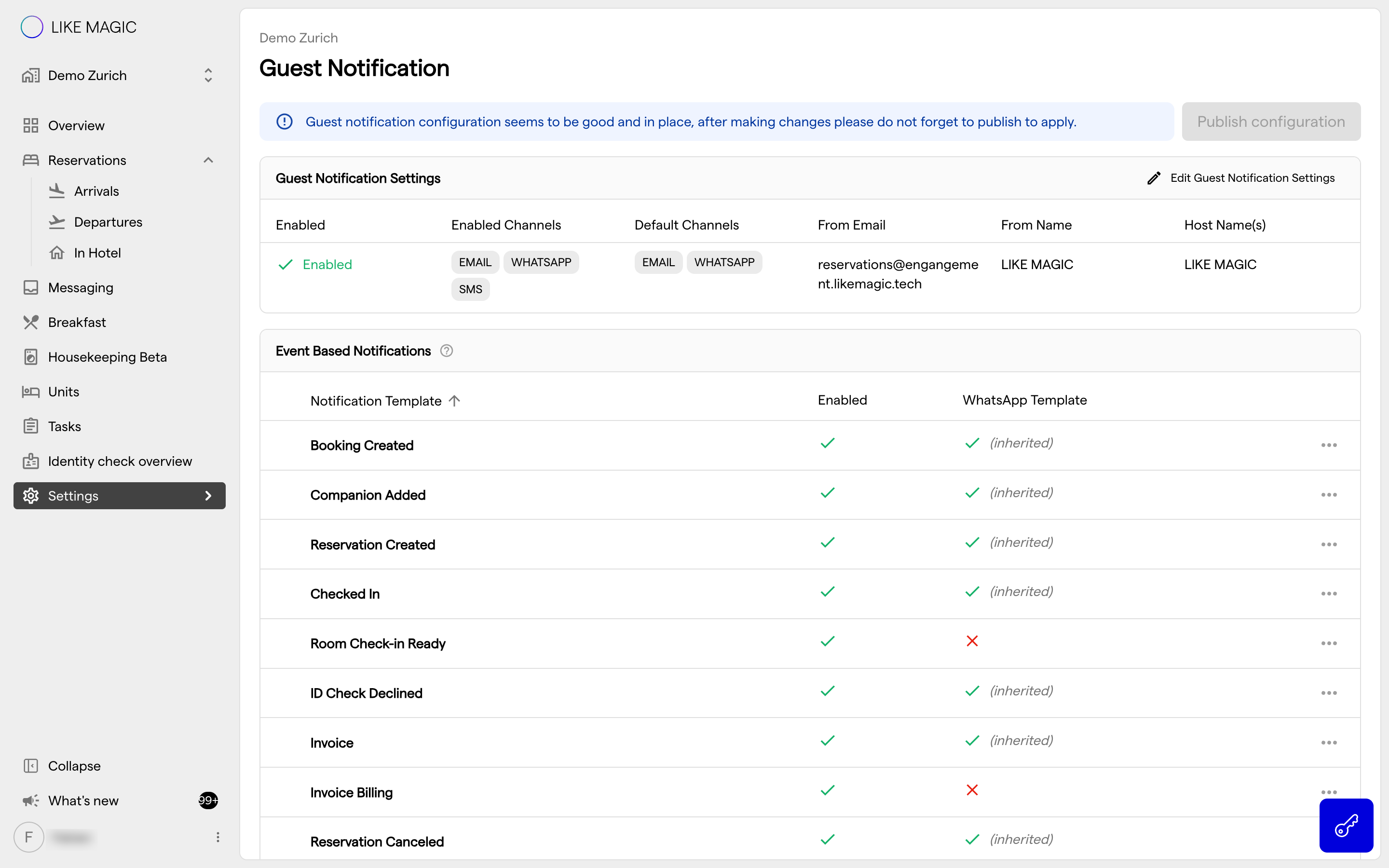
Details & Settings
Certain messages can be adjusted in their timing or even deactivated.
Every notification in the table below can be switched off, except RESEND_GUESTFLOW_LINK. For the time-based ones the timing is adjustable as well. Which notifications are always active is listed in Guest Notification Settings.
| Notification | Timing / Condition | Timing |
|---|---|---|
BOOKING_CREATED | Booking with a Booker other than the Primary Guest, or a Booking with more than one reservation, so the Booker has to complete Booking Management | Trigger-based |
BOOKING_REMINDER | Reminder when Booking Management is still open and the guests per room are not provided by 7 days before arrival | 7 days before arrival |
RESERVATION_CREATED | To the Primary Guest once Booking Management is done, or for a single booking | Trigger-based |
COMPANION_ADDED | To Travel Buddy when Primary Guest provides companion data | Trigger-based |
RESERVATION_CANCELED | When a reservation is cancelled | Trigger-based |
CHECKIN_INTRODUCTION | 2 days before arrival at 14:00, if the Pre-Check-In is not yet completed | 2 days before arrival at 14:00 |
PRE_CHECKIN_REMINDER | At the midpoint between booking and arrival, if the Pre-Check-In is not yet completed | Reservation created far enough in advance (default 30 days) |
CHECKIN_REMINDER | On the arrival day at 11:00, if the Pre-Check-In is not yet completed | Arrival day at 11:00 |
CHECKIN | On the arrival day at 11:00, if the Pre-Check-In is completed | Arrival day at 11:00 |
CHECKED_IN | On the arrival day, once the reservation is In-House and the room is marked Clean | Trigger-based |
CHECKOUT_INTRODUCTION | 1 day before departure, for stays of 3 or more nights | 1 day before departure |
CHECKOUT_ALERT | On the departure day, if the guest has not checked out yet | From 10:30, when departure is less than 30 minutes away |
INVOICE | After check-out | Trigger-based |
CHECKOUT_FOLLOW_UP | One day after check-out | 1 day after departure |
RESEND_GUESTFLOW_LINK | When triggered (Operations Platform) | Trigger-based |
2. Adjustments
To make changes after go-live, please create a Support Ticket.
Note: The set of message types is fixed. What you can have adjusted is the timing of a message and whether it is sent at all.
Both can also be set for one group of guests only, and a group can receive its own wording. See Guest Segmentation.
3. Conclusion
The default flow covers the guest journey from booking to check-out, with fixed triggers and adjustable timings.
To have the flow adjusted for your property, open a Support Ticket. Which notifications you can switch on and off yourself, and where, is described in Guest Notification Settings.