Häfele Dialock Cloud
Häfele Dialock Cloud is Häfele's cloud-connected locking system. Connected to LIKE MAGIC, guests can open their doors from the Guest Portal and receive a physical key card encoded at the kiosk or front desk. LIKE MAGIC mirrors each stay into Dialock Cloud, so access follows the reservation without any manual step. The guest-facing side is described in Mobile Key & Door Access for Guests.
ℹ️ Dialock Cloud is the successor of the classic Häfele Dialock connection. Properties that still run the classic connection are described in that article. Request a Support Ticket if you are unsure which one your property runs.
1. What Guests Get
- 📱 In-app door opening: a hold-to-unlock button in the Guest Portal for each door the guest may open. LIKE MAGIC asks Dialock Cloud to open the lock on the guest's behalf; nothing needs to be installed on the guest's phone.
- 🏷️ Key cards: encoded at a connected encoder station (kiosk or front desk). Encode again for additional cards; earlier cards stay valid.
Access follows the stay automatically: LIKE MAGIC keeps a booking in Dialock Cloud for every reservation (assigned room, arrival and departure, and the reservation status) and updates it whenever the reservation changes (room move, extension, check-in, check-out). A guest who checks in before the scheduled arrival gets access right away. Dialock Cloud never contacts the guest itself; all guest communication comes from LIKE MAGIC.
2. Prerequisites
LIKE MAGIC needs two things from your Dialock Cloud account, handed over during onboarding:
- An access token for LIKE MAGIC. Create it in Dialock Cloud under Access tokens → Create new token and grant it the booking, room, keycard and encoder scopes shown below.
- The location ID of your property in Dialock Cloud.
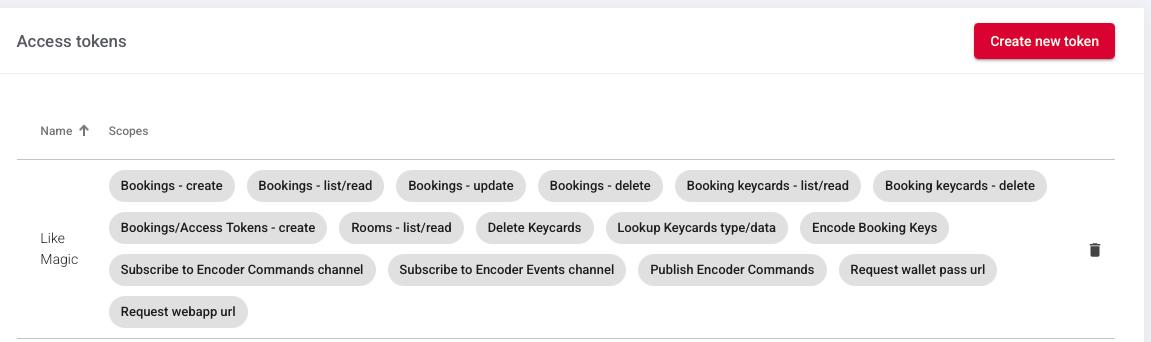
LIKE MAGIC enters both and sets up the connection. Your rooms and their doors must exist in Dialock Cloud before that: LIKE MAGIC works with Dialock rooms, and the room list of your location is what appears in Settings → Door Access for mapping (see Door Access).
3. Troubleshooting
| Symptom | Likely cause |
|---|---|
| No rooms appear in Door Access | Access token or location not set up - request a Support Ticket to have the connection checked |
| Room is missing after changes in Dialock Cloud | Changes in Dialock Cloud reach LIKE MAGIC with a sync - request one via a Support Ticket (see Door Access, section Sync Locks from Your Door Provider) |
| Guest can't open the room door | Room access starts at check-in and follows the assigned unit - check the reservation's status and the unit mapping of the room |
| Guest can't open a common door | The door's room is not set to Public / Public In-House, or the room no longer exists in Dialock Cloud - check the mapping, then request a Support Ticket if it persists |
| Encode key fails well before arrival | The stay's Dialock Cloud booking does not exist yet - encoding becomes possible once door access for the stay has begun |
| Card encoding fails or times out | The kiosk's linked encoder station is offline or not linked, or the card could not be read - check the encoder configuration and try another card |
4. Conclusion
With Häfele Dialock Cloud connected, LIKE MAGIC keeps the stay in sync with Dialock Cloud (the booking, the room, the dates), and guests open their doors in the app or with a card encoded at the kiosk or front desk. Your part is the access token and the location ID; mapping, sync and encoder stations follow the general Door Access procedure.
Useful links:
- Häfele Dialock: the classic Häfele connection
- Door Access: mapping, sync and encoder stations for every door provider
- Mobile Key & Door Access for Guests: the guest experience