Billing and Folio
The folio is the running bill for a reservation: the list of charges and payments that makes up what the guest owes. In LIKE MAGIC, front-desk staff work with the folio from the Billing tab of the reservation detail drawer, while guests can view and settle their own bill through the digital guest journey. This article covers both sides and how they meet at the open balance.
ℹ️ Note: Folio and billing behave differently by the property's PMS. This capability is available on Opera Cloud and Mews properties. It is not available on Apaleo. Charge and invoice handling follow the connected PMS.
1. Who Can Use This
The Billing tab is one of the reservation detail drawer's tabs that requires Platform pricing. On the Core tier the tab is shown locked with an upgrade prompt instead. See Pricing Tiers.
Working the folio is a front-desk (Host) activity. Payment capture itself is handled by the connected payment service provider. See Payment Configuration.
2. Opening the Folio
- Open Reservations and find the reservation.
- Open its detail drawer.
- Select the Billing tab.
The Billing tab shows the reservation's folio: its charges, its payments, and the resulting balance.
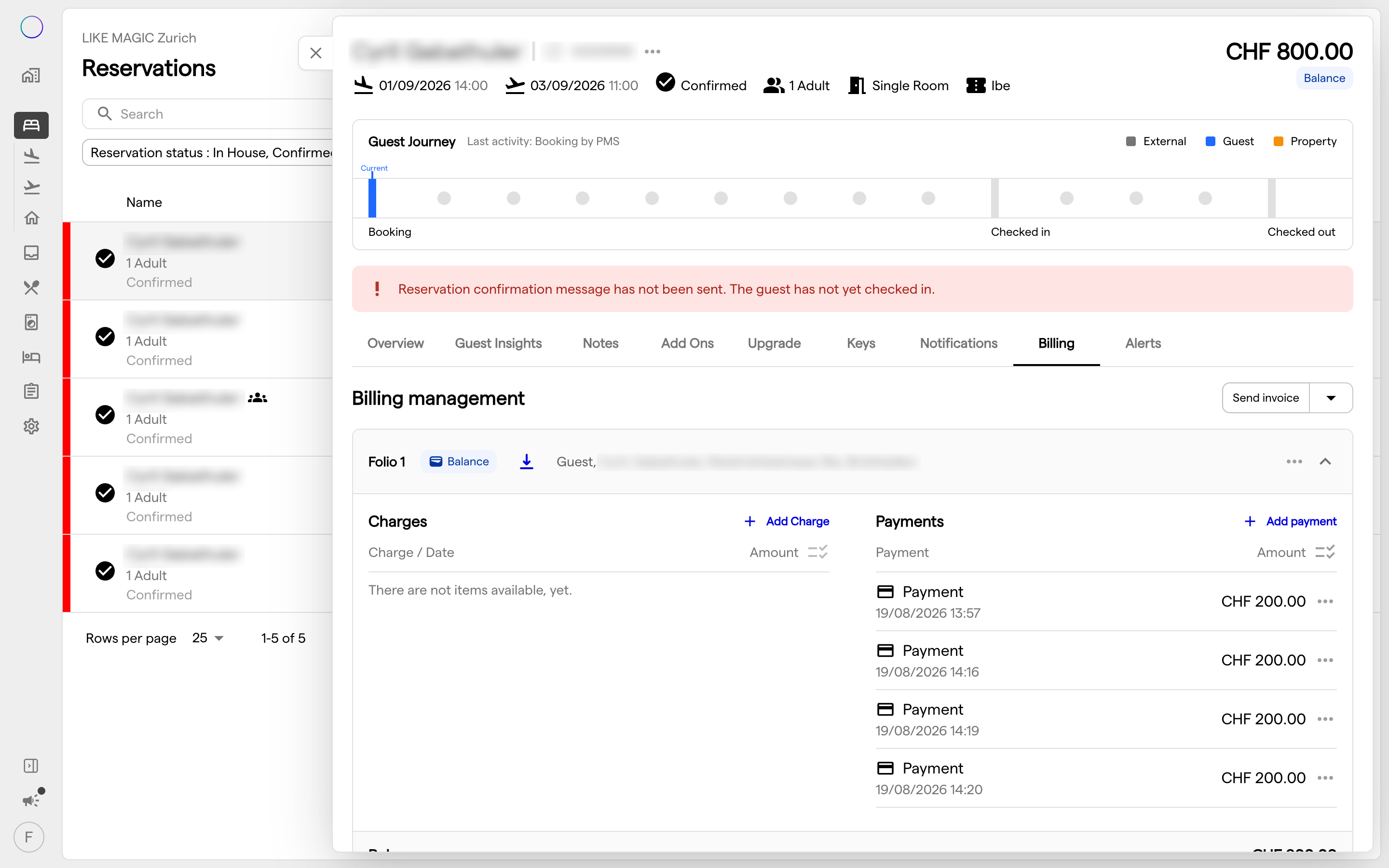
3. Charges and Payments
The folio lists every charge (accommodation, services, shop and food & beverage items) and every payment recorded against the reservation. Pricing and charges are sourced from the property's PMS, so what appears reflects the PMS record for that stay.
ℹ️ Note: Because charges are PMS-coupled, an item added in the PMS or through a guest-journey flow (for example a shop purchase or an extended stay) appears on the folio here. If an expected charge is missing, check the PMS and the originating flow before assuming a display issue.
4. Open Balance
The open balance is the part of the folio that is not yet paid. It is the single number that tells staff and guest what is still owed.
- Staff see the open balance on the Billing tab.
- Guests see the same open balance in their self-service billing and can pay it (section 6).
ℹ️ Note: A payment taken through the guest journey settles the open balance and posts to the folio via the payment provider's result. If a guest reports they paid but the balance is unchanged, verify the payment reached the folio (see Payment Configuration).
5. Invoicing
The folio is the basis for the guest's invoice. Invoice content (the charges, the billing address, and tax presentation) is drawn from the reservation and the property's PMS.
- The billing address can be captured or edited as part of the guest's billing details.
- Tax/VAT presentation on the bill follows the property's configuration.
ℹ️ Note: Invoice generation and numbering are governed by the connected PMS. For Opera Cloud and Mews properties, confirm the final invoice in the PMS record where required by local rules.
6. Guest Self-Service Billing
Guests can handle much of their own billing through the digital guest journey, which reduces front-desk load:
- View bills / folio: the guest sees their charges.
- Open balance: the guest sees any amount still owed and can pay it.
- Extend stay: the guest can extend their stay, which produces an extend-stay bill to pay; the extension writes back to the PMS via the reservation.
ℹ️ Note: These guest-facing screens are part of the digital guest journey on Mews and Opera Cloud properties and depend on the property's configuration and PMS. As an operator you enable and configure them; the guest then self-serves.
7. Conclusion
The folio is the reservation's running bill, and the open balance is where staff and guest views meet. Staff read and work the folio from the Billing tab; guests view and settle their own bill and can extend their stay online. Charges, invoicing and capture are PMS- and provider-coupled. When something looks wrong, trace it to the PMS or the payment provider rather than the display.