Booking Management
Ensuring that all guests are correctly recorded and can start their guest journey.
Introduction
Booking Management comes into play when a booking includes multiple reservations and different people are involved in the stay. It helps assign guests correctly, complete missing information, and ensure that all guests receive the necessary access details.
Conflicts can occasionally arise in group bookings with allocation quotas or when bookings are made through external tools. This article explains how to handle these situations.
1. What is Booking Management, and why is it important?
Booking Management ensures the efficient handling of group bookings. It becomes relevant when the person making the booking (Booker) is not the same as the guests (Main Guest) or when multiple rooms are booked under the same name with the same travel dates (group booking or multiple individual bookings).
The goal is to ensure that every actual overnight guest can complete their Digital Guest Journey and gain access to the Guest Portal and room key.
2. What roles exist in Booking Management?
- Booker: The person making the booking but not necessarily staying overnight.
- Main Guest: The primary guest staying in the room, responsible for the reservation, billing address, and payment.
- Travel Buddy: A companion who stays in the same room as the Main Guest.
- Host: The hotel staff, who intervene in Booking Management if needed.
3. When and why is intervention required?
Our system automatically sends the reservation confirmation message with the online check-in link to guests when their reservation is unique and complete:
- Unique: The name, first name, and email address are different from other reservations within the booking.
- Example of a conflict: the name and first name are unique, but the email address appears in multiple reservations.
- Complete: The name, first name, and email address are provided at the time of booking.
- Example of a conflict: the name and first name are provided, but the email address is added later.
If these criteria are not met, either the Booker or the Host must step in to complete the missing information. This situation may occur with allocation quotas or bookings made through externally connected booking engines.
4. Intervention (Perspective, Booker)
Option a)
The Booker can specify guests for each room via the email they received:
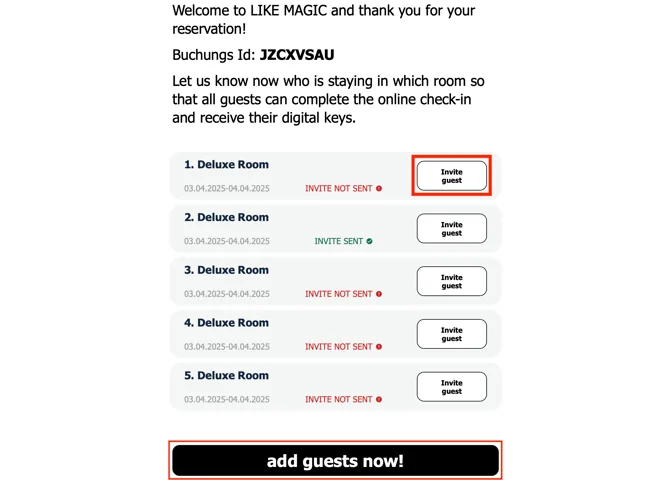
They can either click “Invite Guest” to edit a specific room or “Add Travelers Now” to access the booking overview. Further details on this process are explained in Option B below.
Option b)
The Booker can manage booked rooms via the Booking Overview. By clicking on the booking, they can open the reservations:
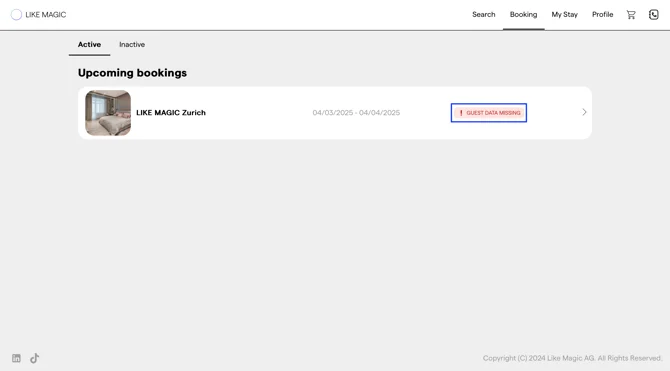
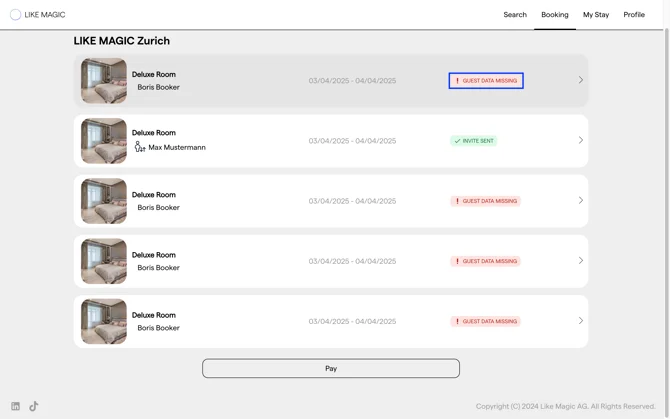
The system will indicate missing guest details, signaling that action is required before guests can begin their journey. Clicking on a specific reservation allows the Booker to edit the guest information:
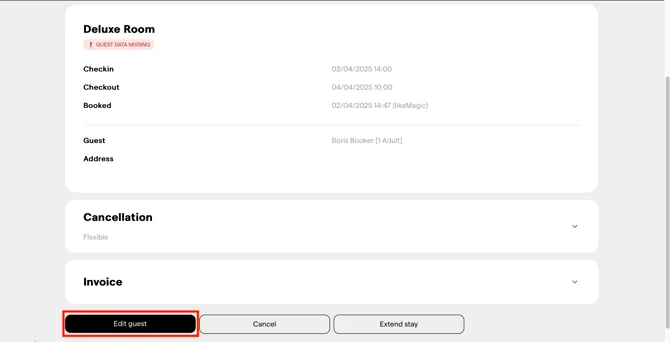
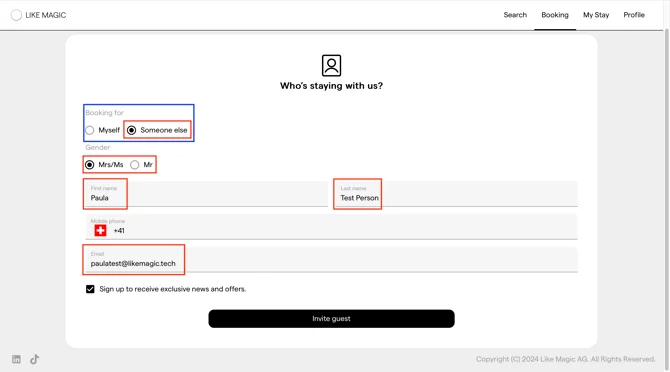
First, they must specify whether they themselves or another person will be staying in the room.
They can then add the missing guest details. An email address is mandatory, while a phone number is optional.
The guest information must be unique and complete (as defined above).
Once the guest has been correctly invited, LIKE MAGIC will confirm this in the Booking Overview after clicking the “Invite Guest” button.
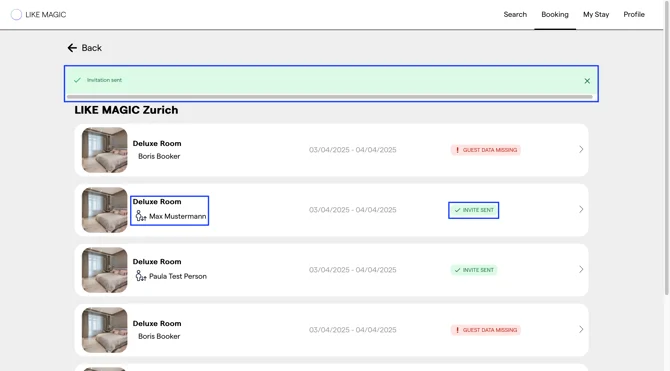
✅ The guest (e.g., Max Mustermann) can now start their guest journey and access their room key upon arrival.
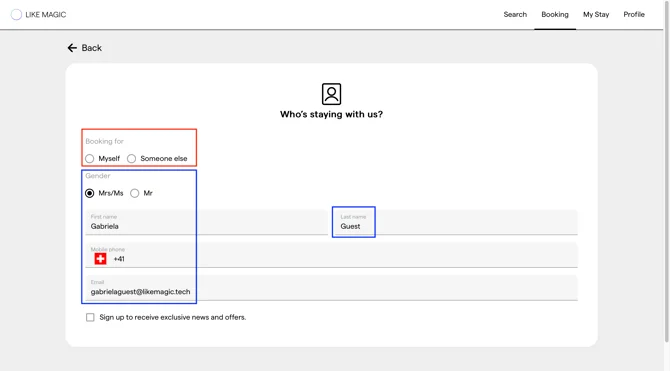
ℹ️ Sometimes, manually created bookings (via the PMS or an external tool) lack the specification of whether the booking is for “Me” (Booker) or “Someone Else”. In such cases, this must be corrected before the guests receive the reservation confirmation message.
5. Intervention (Perspective, Host)
Intervention via PMS:
In the PMS, it must be ensured that the guest is unique and that all required guest details are complete. If you have any questions, refer to your PMS system’s documentation or contact their support team.
Intervention via Operations Platform/Guest Portal:
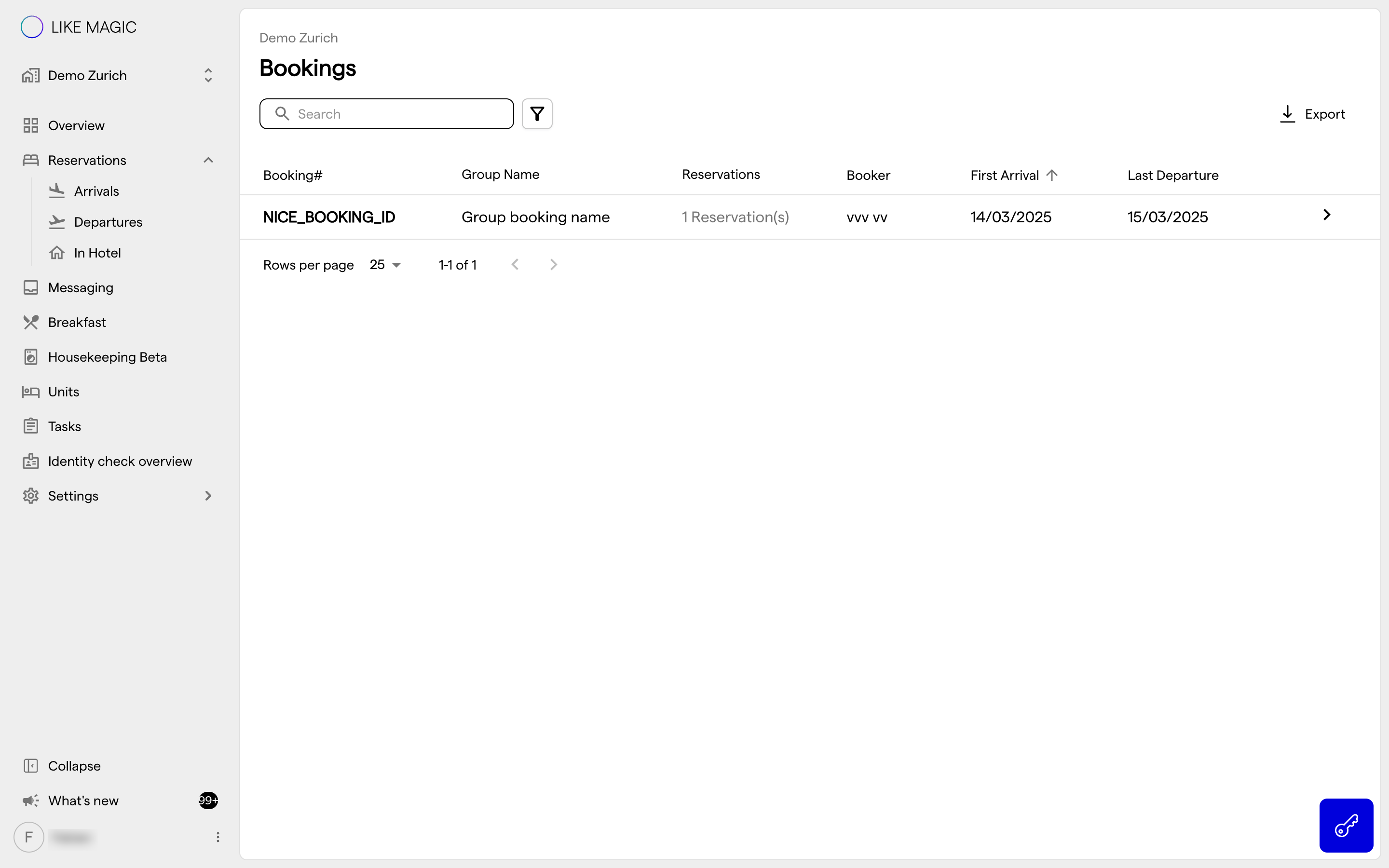
To intervene as a Host, search for the reservation in the Operations Platform and run the reservation action Jump to booking:
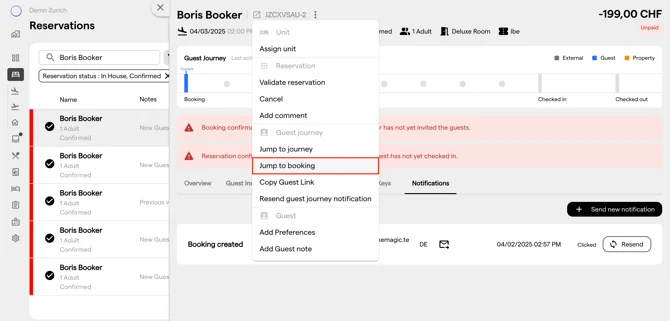
This will direct you to the Booking Overview, where you can complete the Booking Management process (as explained under Intervention Perspective: Booker).
6. Guest-side booking actions (cancel and pay)
Beyond the staff-side steps above, guests can manage their own booking from the Booking Overview in the Digital Guest Journey. There a guest reviews their stay across all reservations in the booking and, where you allow it, can cancel a reservation or pay an open balance without contacting the front desk.
LIKE MAGIC switches these two actions per property, independently of each other:
- Guest cancellation: whether a guest can cancel their reservation from the Booking Overview.
- Guest payment: whether a guest can settle an open balance from the Booking Overview.
When an action is turned off, its button simply does not appear for the guest; the staff-side workflow above is unaffected. If you want one of the actions switched on or off for a property, request it via a Support Ticket.
7. Summary
Booking Management ensures that all guests in a group booking are correctly recorded and can start their guest journey. Reservations must be unique (distinct name & email) and complete (all required data provided). If these conditions are not met, the Booker can update missing guest details via the Booking Overview or email. Alternatively, the Host can intervene through the Operations Platform or PMS system. Only once all guests are correctly recorded will they receive their reservation confirmation message and be able to proceed with online check-in.